
Using the Mobile Client home folder synchronization for Apple Server/Client synchronizes files that it probably should not synchronize, possibly causing login problems. At attempted login:
- Machine wakes up successfully.
- Mouse can move, but you cannot bring the login dialog to the front as mouse clicking does not do anything
- Typing does not do anything
- Cannot cancel or switch user.
I did not have this problem before I started home folder syncing on my OS X server. My suspicion for the culprit was synchronize while logging-out option as you do, while using another machine linked to the same account creates some confusion.
To get to the bottom of this, I tested two ways around this:
- Do not use two machines while syncing in progress. Do not sync if logged in to another machine. [did not resolve the issue]
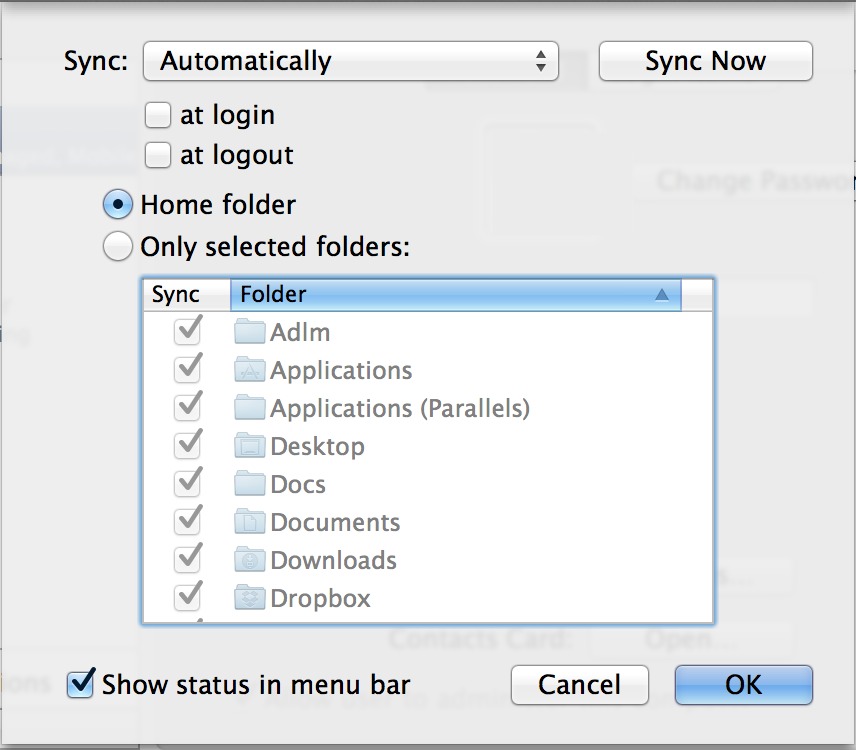
- Stop syncing on login and logout, and only sync during log-in. [resolved the issue] Those are the “at login” and “at logout” options shown in the screen shot.
©2013 EthnoSync.com. All Rights Reserved.